> For the complete documentation index, see [llms.txt](https://docs.ai-declare.com/llms.txt). Markdown versions of documentation pages are available by appending `.md` to page URLs; this page is available as [Markdown](https://docs.ai-declare.com/quickstart.md).
# Quickstart
## What is AI Declare?
AI Declare is an AI agent for REST API code generation. The way you configure the agent is by using a **DSL** (Domain Specific Language). The DSL is embedded in the **Scala** programming language, and it allows to the programmers to create complex secured REST APIs in just a few minutes in different languages / frameworks.
## Prerrequisites
* Basic programming skills are a prerequisite..
* **IntelliJ IDEA (Community or Ultimate) + Scala plugin**
* Install IntelliJ IDEA.
* In *Settings → Plugins*, search **Scala** and install it.
* (Recommended) JDK **21+**, Scala **3.3+**, sbt **1.10+**.
* **ChatGPT API token (OpenAI API key)**
* Create/get your API key from your [OpenAI Platform account](https://auth.openai.com/log-in).
* Top up some credit [here](https://platform.openai.com/settings/organization/billing/overview)
* **Register** as a user [here](https://www.ai-declare.com/register)
## Your first AI Declare project
### 1) Setup environment
**Register** as a user [here](https://www.ai-declare.com/register)
Setup your AI Declare **credentials**
{% tabs %}
{% tab title="Linux" %}
```bash
USERNAME=your_aideclare_username
PASSWORD=your_aideclare_password
install -m700 -d "$HOME/.aideclare" && printf 'username=%s\npassword=%s\n' "$USERNAME" "$PASSWORD" | install -m600 /dev/stdin "$HOME/.aideclare/credentials"
```
{% endtab %}
{% tab title="Windows" %}
```powershell
$USERNAME = 'your_aideclare_username'
$PASSWORD = 'your_aideclare_password'
New-Item -ItemType Directory -Path "$HOME\.aideclare" -Force | Out-Null; "username=$USERNAME`npassword=$PASSWORD" | Set-Content -Path "$HOME\.aideclare\credentials" -Encoding UTF8
```
{% endtab %}
{% endtabs %}
### 2) Setup a Scala project
1. Open IntelliJ IDEA
2. **New Project** → **Scala** → **sbt**.
3. Choose your **JDK**, set **Scala 3.x** (any recent 3.x).
4. Name the project (e.g., `aideclare-sample`) → **Create**.
This generates:
* `build.sbt`
* `project/build.properties`
* `project/` directory for sbt metadata
5. Add the following code to build.sbt
```groovy
libraryDependencies ++= Seq(
// AI Declare SDK
"com.ai-declare" %% "sdk" % "1.1.2-BETA"
)
```
6. Sync the project
### 3) Implementation
#### Data model definition
First, define your data model. Create one Scala **case class** for each table in your database. Mark primary keys with `@id` and foreign keys with `@fk`, and have every case class `derives EntityMetadata`.
If a case class represents an application user, also derive `UserInfo`. In that case, annotate the username and password fields with `@username` and `@password`, respectively.
```scala
import com.aideclare.entities.dsl.syntax.{fk, id, password, username}
import com.aideclare.entities.dsl.typeclasses.{EntityMetadata, UserInfo}
import java.time.LocalDate
case class Student(
@id studentId: Int,
email: String,
name: String,
surname: String,
birthDate: LocalDate,
@fk[StudentGroup] groupId: Int
)derives EntityMetadata, UserInfo
case class Professor(
@id(autogenerated = true) id: Int,
@username email: String,
name: String,
@password password: String,
surname: String
)derives EntityMetadata, UserInfo
case class StudentGroup(
@id id: Int,
name: String,
title: String,
academicYear: Int,
@fk[Professor] professorId: Int
)derives EntityMetadata
case class Admin(
@id @username username: String,
@password password: String,
email: String
)derives EntityMetadata, UserInfo
```
#### APIs definition
Next, define your REST APIs. You can expose four kinds of endpoints:
* **Public**: open to everyone; no authentication required.
* **Authenticated**: access restricted to specific user types/roles.
* **Me**: operate on the authenticated user’s own data.
* **Sub-APIs**: endpoints nested under another API; they inherit the parent’s access controls.
```scala
import com.aideclare.entities.dsl.gadt.*
import com.aideclare.entities.ExecutionSender
object HighscholAppGenerator extends App:
val highschoolSystem: System =
// The system name is highschool
System("highschool")
// Adds an authenticated API for Admin users.
// Manages Profesor entity (list, create, update and delete)
// route=/professor
.addAuthenticatedApi[Professor, Admin](
api[Professor]
// Subapi of /professor API, also for Admin users.
// Manages StudentGroup entity (list, create, update and delete)
// route=/professor/{professorId}/studentgroup
./[StudentGroup](
api[StudentGroup]
// Subapi of /professor/{professorId}/studentgroup API, also for Admin users.
// Manages Student entity (list, create, update and delete)
// route=/professor/{professorId}/studentgroup/{studentGroupId}/student
./[Student]
)
)
// Adds an authenticated API for Admin users.
// Manages Student entity (list, create, update and delete)
// route=/student
.addAuthenticatedApi[Student, Admin]()
// Adds an authenticated Me API for Professor users.
// Allows each Professor to manage its own data
// route=/me/professor
.addMeApi[Professor](
singleResourceApi[Professor]
// Subapi of /me/professor API.
// Manages StudentGroup that are related to the authenticated professor
// route=/me/professor/studentgroup
./[StudentGroup](
// Subapi of /me/professor/studentgroup API.
// Manages Students that are related to a StudentGroup that is related
// to the authenticated professor
// route=/me/professor/studentgroup/{studentGroupId}/student
api[StudentGroup]./[Student]
)
)
// Adds an authenticated Me API for Student users.
// Allows each Student to manage its own data
// route=/me/student
.addMeApi[Student]()
```
### 4) Create a project in AI Declare site
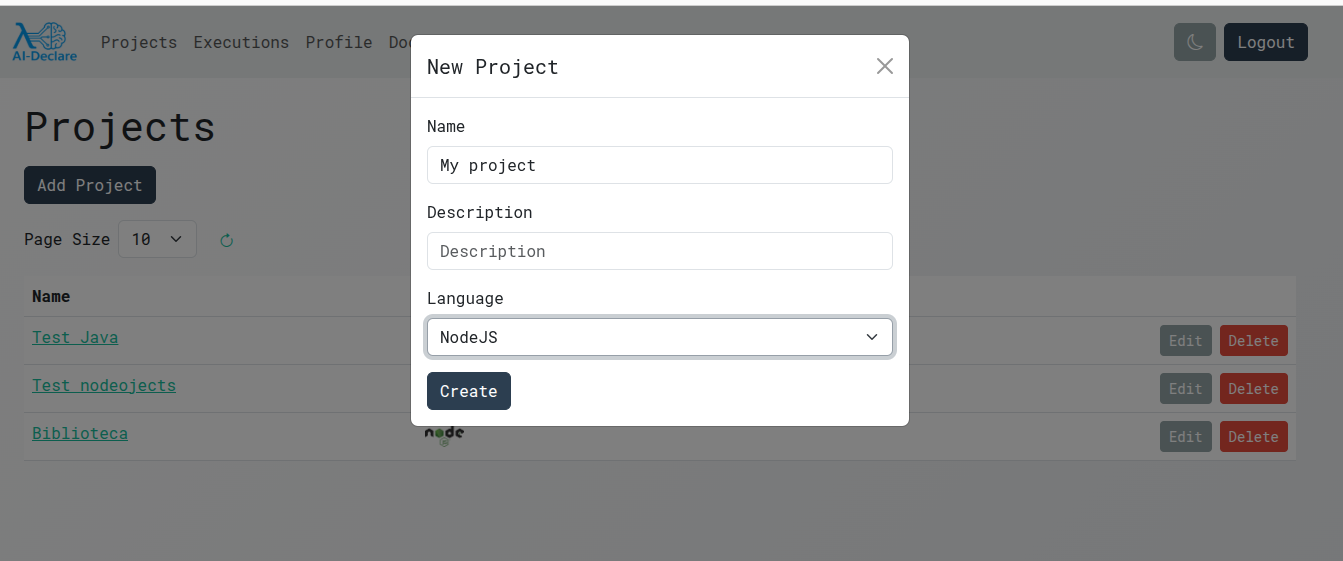
On the AI-Declare site, create a new project, then select the target language and framework for code generation.
### 5) Run an execution
Use `ExecutionSender` to send the definition to ai-declare server as follows
import com.aideclare.entities.dsl.gadt.*
import com.aideclare.entities.ExecutionSender

object HighscholAppGenerator extends App:

  val highschoolSystem: System =
    // The system name is highschool
    System("highschool")
      // Adds an authenticated API for Admin users.
      // Manages Profesor entity (list, create, update and delete)
      // route=/professor
      .addAuthenticatedApi[Professor, Admin](
        api[Professor]
          // Subapi of /professor API, also for Admin users.
          // Manages StudentGroup entity (list, create, update and delete)
          // route=/professor/{professorId}/studentgroup
          ./[StudentGroup](
            api[StudentGroup]
              // Subapi of /professor/{professorId}/studentgroup API, also for Admin users.
              // Manages Student entity (list, create, update and delete)
              // route=/professor/{professorId}/studentgroup/{studentGroupId}/student
              ./[Student]
          )
      )
      // Adds an authenticated API for Admin users.
      // Manages Student entity (list, create, update and delete)
      // route=/student
      .addAuthenticatedApi[Student, Admin]()
      // Adds an authenticated Me API for Professor users.
      // Allows each Professor to manage its own data
      // route=/me/professor
      .addMeApi[Professor](
        singleResourceApi[Professor]
          // Subapi of /me/professor API.
          // Manages StudentGroup that are related to the authenticated professor
          // route=/me/professor/studentgroup
          ./[StudentGroup](
            // Subapi of /me/professor/studentgroup API.
            // Manages Students that are related to a StudentGroup that is related
            // to the authenticated professor
            // route=/me/professor/studentgroup/{studentGroupId}/student
            api[StudentGroup]./[Student]
          )
      )
      // Adds an authenticated Me API for Student users.
      // Allows each Student to manage its own data
      // route=/me/student
      .addMeApi[Student]()

  val sender = ExecutionSender()
  sender.send(highschoolSystem)
When you run the code you will be asked to choose a project:
```log
Available projects:
1. Test Java
2. Test nodeojects
3. My project
```
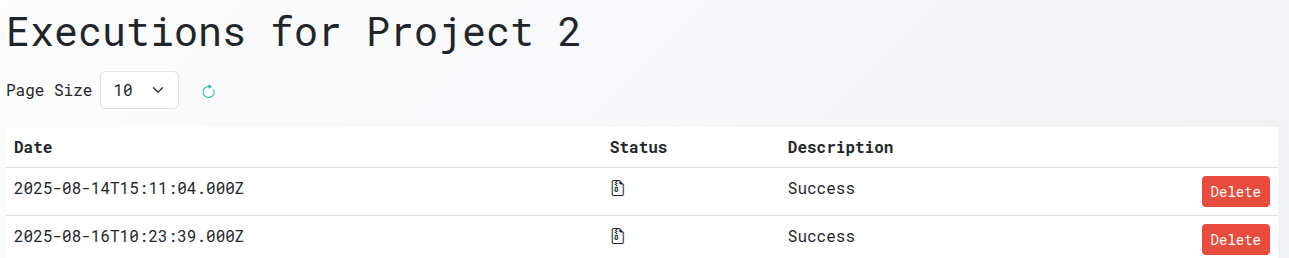
### 6) Download the code from Executions screen
That's it, the code will be generated in a few minutes and you will be able to download it from the web site.
Click in the file icon to download generated sources.
---
# Agent Instructions
This documentation is published with GitBook. GitBook is the documentation platform designed so that both humans and AI agents can read, navigate, and reason over technical content effectively. Learn more at gitbook.com.
## Querying This Documentation
If you need additional information that is not directly available in this page, you can query the documentation dynamically by asking a question.
Perform an HTTP GET request on the following URL with the `ask` and `goal` query parameters:
```
GET https://docs.ai-declare.com/quickstart.md?ask=&goal=
```
`ask` is the immediate question: it should be specific, self-contained, and written in natural language.
`goal` is what the user is ultimately trying to achieve, the reason they need the answer. Sharing it helps GitBook give you a better, more relevant answer. A goal is most helpful when it describes the outcome the user wants rather than restating the question. For example, with `ask=how do I create an API token`, a goal like `build a script that syncs our docs to a CMS` lets GitBook tailor the answer to that use case.
The response will contain a direct answer to the question and relevant excerpts and sources from the documentation.
Use this mechanism when the answer is not explicitly present in the current page, you need clarification or additional context, or you want to retrieve related documentation sections.